I didn't think I'd bother setting anything like this up because I'm self-hosting the forum but I ended up doing it more as a project/learning activity. I'm going to send out an email to all active members, linking to this thread. That's not something I'll do regularly, I promise. If you want to adjust your email preferences, follow the screenshots below. Yours will look a little different since you won't have moderator email options but I'm confident you can all figure it out.
1) Click the down arrow next to your name and select profile
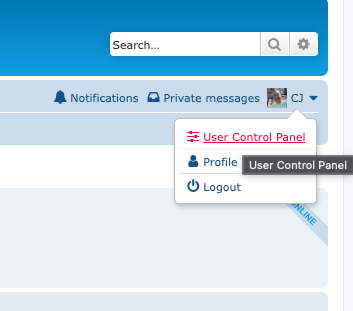
- Screenshot 2026-09-16 at 7.15.07 AM.png (25.04 KiB) Viewed 836 times
2) Under the board preferences TAB select
Edit Posting Defaults and set
Notify me upon replies by default if you want. Don't forget to hit
submit.
3) Under Edit notification options, check all of the situations you want to be notified. I'd recommend
Someone replies to a topic to which you are subscribed,
Someone quotes you in a post, and
Someone sends you a private message. The options for Someone thanks you for a post or removed thanks probably are excessive, but they are options. Notably I'm guessing people have not used the feature to subscribe to entire forums, so those settings won't generate emails. Don't forget to click
submit.
Obviously if you do not want to receive emails, you can uncheck any or all of these, or, maybe you only want get emails when someone quotes you or private messages you.
If you want to subscribe to existing topics, simply go into the thread and click the wrench and click Subscribe topic.


